15+ hrs
Average Admin Time (Manual)
Weekly admin hours without management software
Driving school management software centralizes student records, scheduling, payments, and reporting into one integrated system. It eliminates paperwork, reduces admin time, and helps you grow your business.
Last updated: January 2026 | Reading time: 12 minutes
Weekly admin hours without management software
Reduction in administrative workload
With automated billing and scheduling
Digital transformation in the industry
With student progress portals and communication
With automated invoicing and reminders
Driving school management software is a comprehensive platform that handles all aspects of running a driving school: student records, scheduling, payments, instructor management, communication, and business reporting. It replaces the patchwork of spreadsheets, paper files, and separate tools that many schools rely on.
The goal is simple: spend less time on admin and more time growing your business and teaching students to drive safely.
Complete student profiles with DVSA competency tracking (17 categories, 62+ skills), student portal access, and per-student notification preferences.
Drag-and-drop calendar with day/week/month views, three-way conflict detection, automated reminders, and recurring lesson series.
Invoice lifecycle management, payment recording (cash, bank transfer, cheque), lesson packages, and email delivery. Online card payments coming soon.
Revenue reports, pass rates, instructor performance, and business insights.
Related: Driving School Scheduling Software Guide
Managing student information effectively is at the core of every successful driving school. Good software makes this effortless.
Each student should have a comprehensive profile containing:
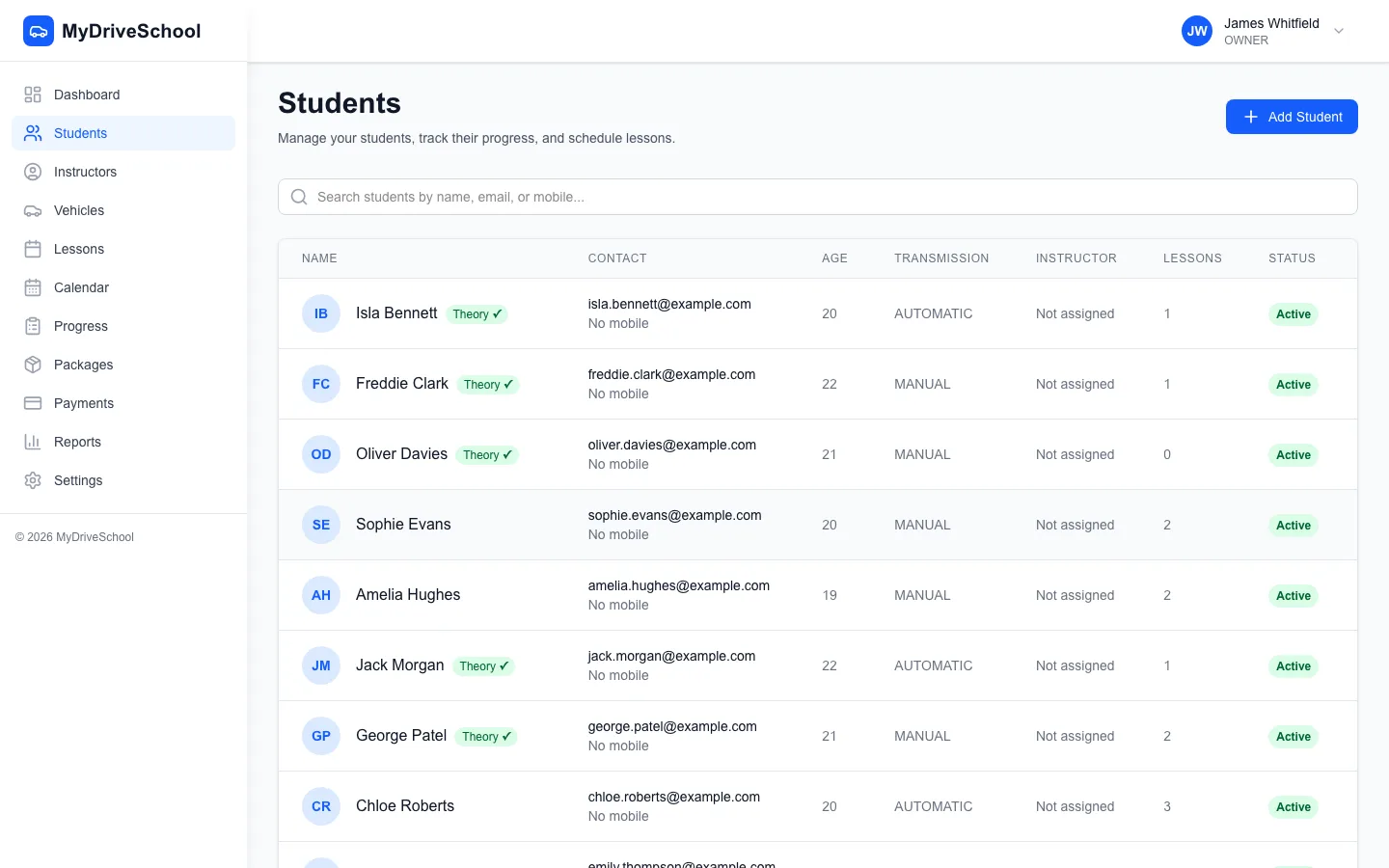
Student management with search, filters, and paginated records
Track student progress against the full DVSA competency framework:
This ensures consistency across multiple instructors and gives students clear visibility into their progress.
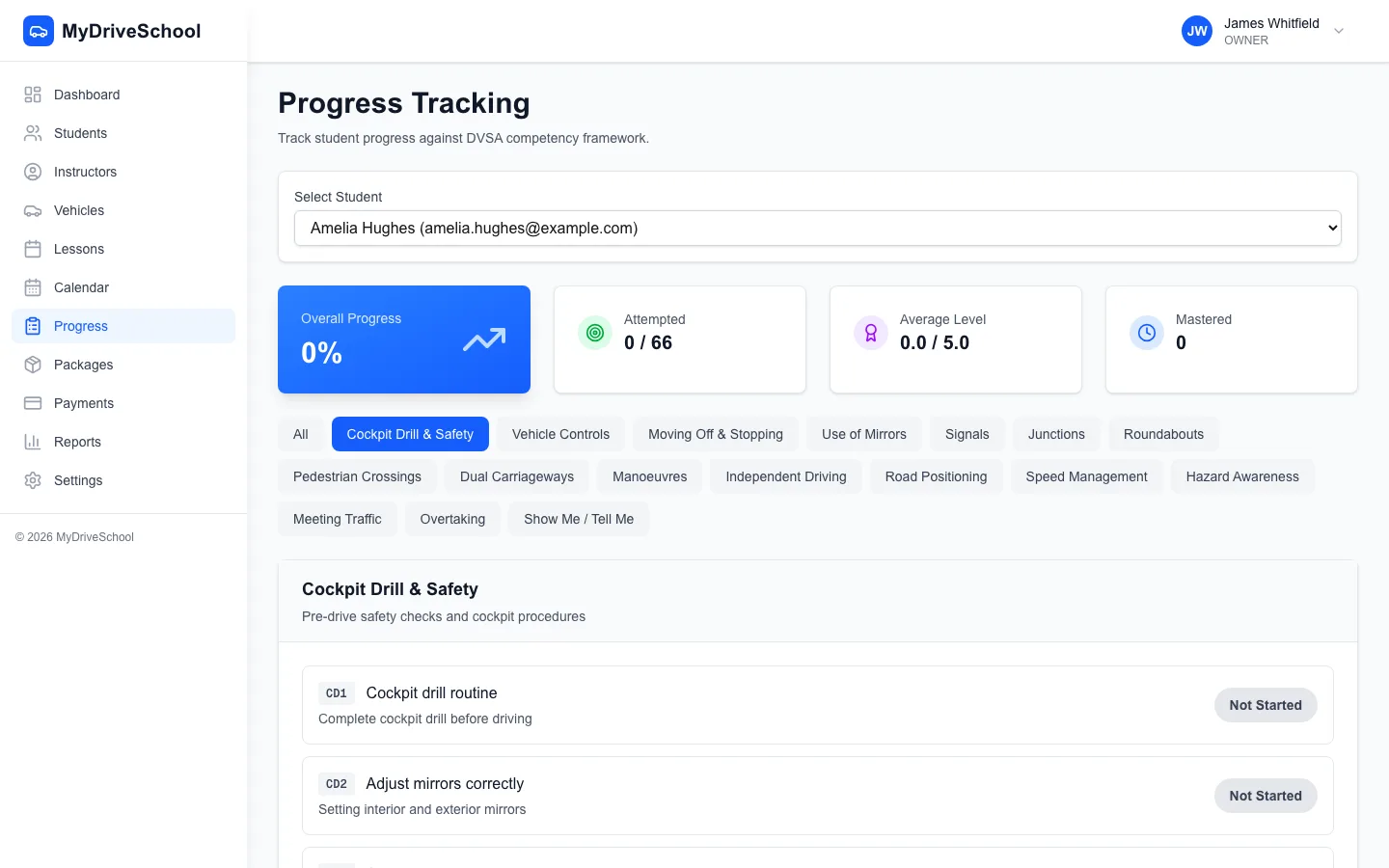
DVSA competency tracking with 17 categories and 6-level proficiency scale
Related: Student Management for Driving Schools: Complete Guide
Students get their own secure login (JWT authenticated) to self-serve:

Student DVSA progress view on mobile
A dedicated parent/guardian portal for minor students is on our roadmap.
Managing money shouldn't be complicated. Good management software handles payments smoothly.
Record payments and manage invoices through a complete workflow:
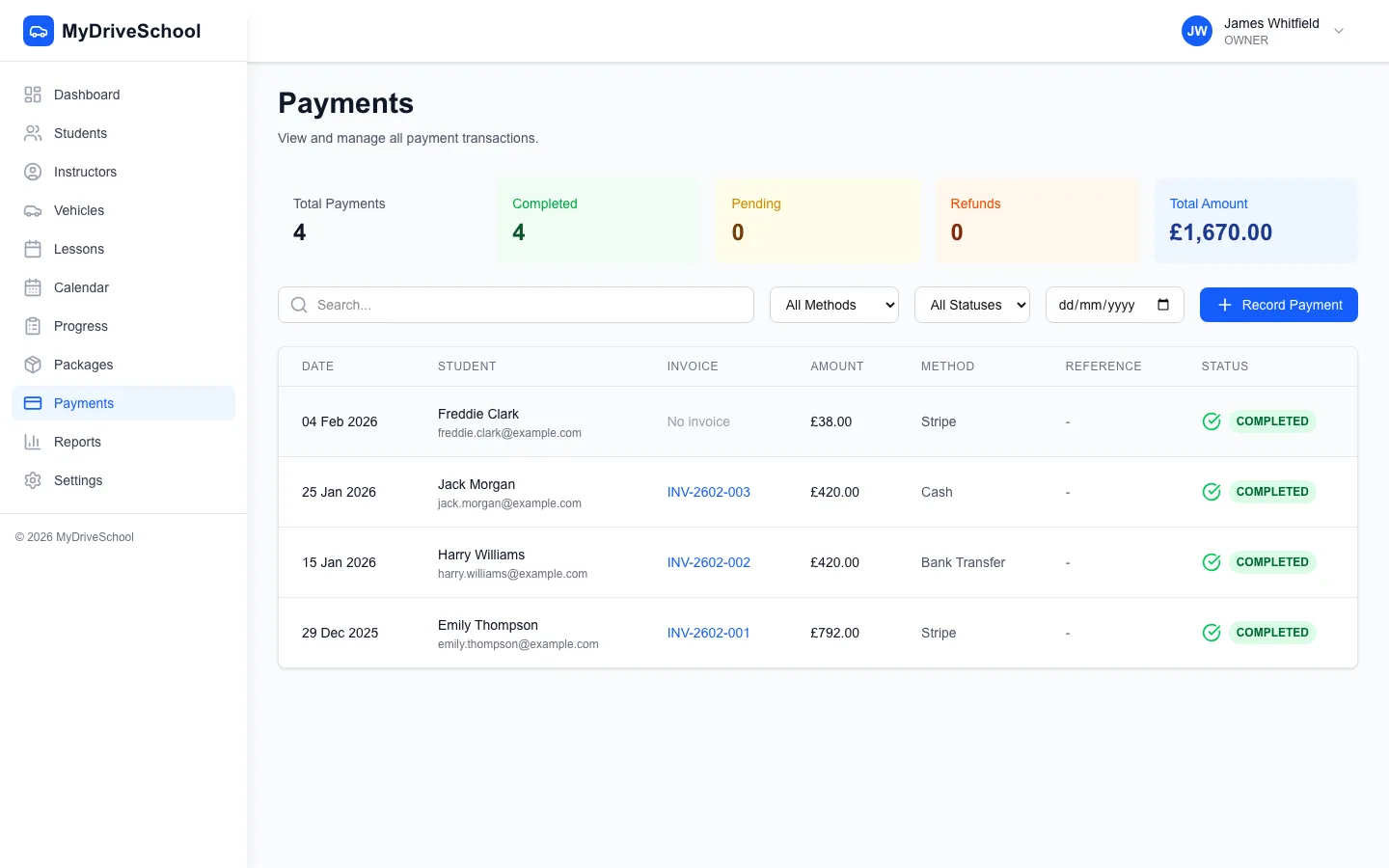
Professional invoicing with payment tracking and email delivery
Online card payments coming soon
Stripe integration for online card payments is in development. Currently, the system supports manual payment recording with full invoice lifecycle management.
Sell lesson packages (e.g., 10 lessons at a discount) and track:
Related: Driving School Payment Processing Guide
As your school grows, managing instructors becomes more complex. Software helps you stay organised.
Give instructors their own login with role-based access (Owner, Manager, Instructor, Admin) to:
You can't improve what you don't measure. Good reporting helps you make better business decisions.
A good dashboard shows key metrics at a glance:
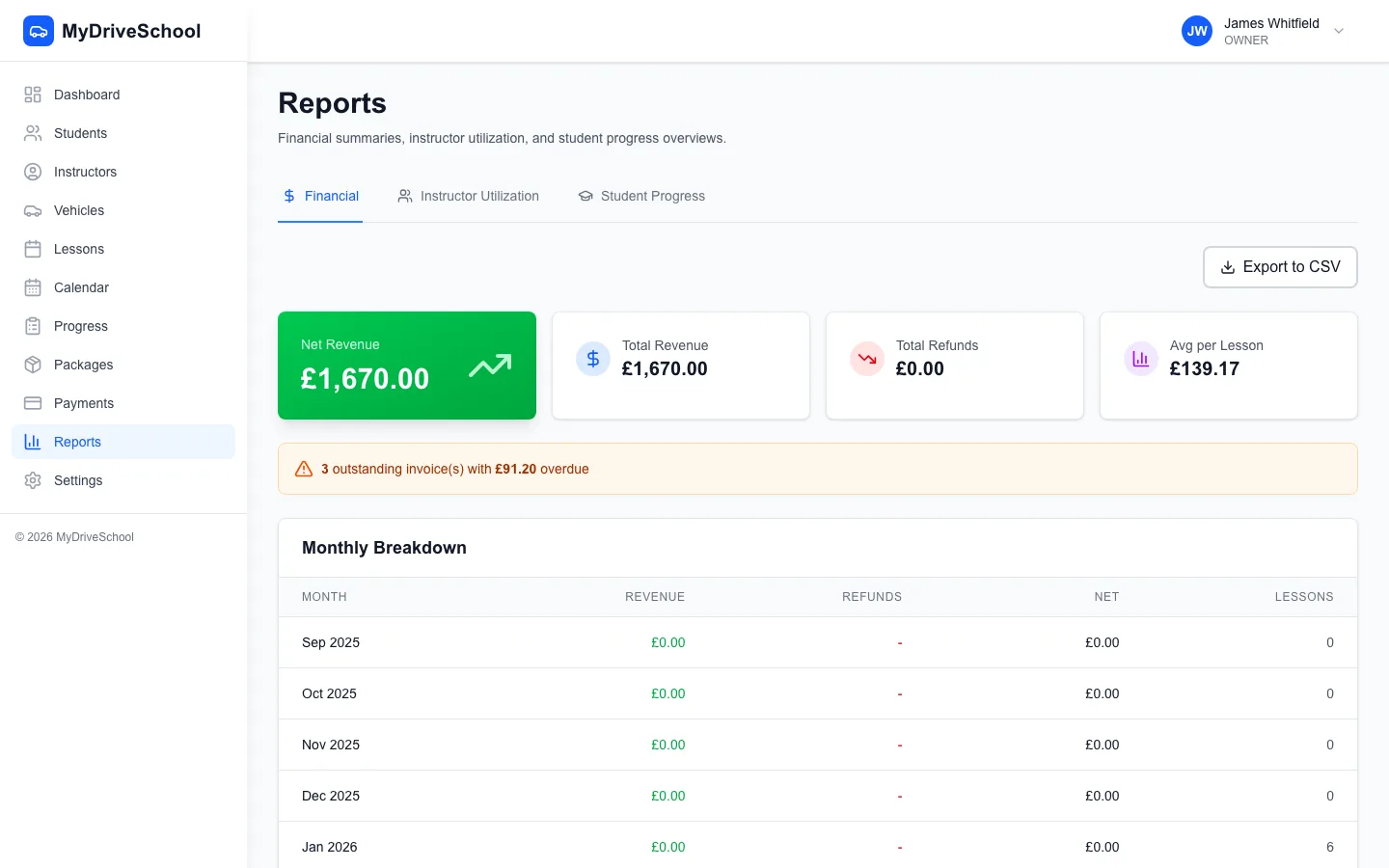
Financial reports with revenue trends and key business metrics
Before investing in software, understand your potential earnings and costs. Our free calculator shows your effective hourly rate, break-even utilization, and profit projections with UK industry benchmarks.
Calculate Your Revenue & Earnings| MyDriveSchool | Generic Tools | Spreadsheets | |
|---|---|---|---|
| DVSA Competency Framework (62+ Skills) | ✓ | ✗ | ✗ |
| Invoicing & Payment Recording | ✓ | ✗ | ✗ |
| Instructor Management | ✓ | ✗ | ✗ |
| Student Self-Service Portal | ✓ | ✗ | ✗ |
| Business Analytics & Reports | ✓ | ✗ | ✗ |
| Automated Reminders (SMS/Email) | ✓ | ✗ | ✗ |
| Package Sales & Tracking | ✓ | ✗ | ✗ |
| Role-Based Instructor Access | ✓ | ✗ | ✗ |
| Vehicle Compliance Tracking | ✓ | ✗ | ✗ |
| DVSA Test Date Tracking | ✓ | ✗ | ✗ |
Driving school management software is an all-in-one platform that handles student records, scheduling, payments, instructor management, and reporting. It replaces spreadsheets and paper records with automated digital systems that save 15+ hours weekly and increase revenue by 22% through better organization and automated workflows.
Costs range from £29-150 per month depending on features and school size. MyDriveSchool offers flat monthly pricing from £29 (Solo ADI) to £79 (Multi-instructor school) with all features included—no per-user, per-student, or per-SMS fees that punish growth.
Yes. MyDriveSchool includes the full DVSA competency framework with 17 categories and 62+ skills, each tracked on a 6-level proficiency scale (Not Started to Test Ready). This provides cross-instructor continuity—any instructor can pick up exactly where the last left off. Students view their own progress through their secure portal.
Yes. Record payments via cash, bank transfer, and cheque. Create invoices with line items, track status through a full lifecycle, and send to students via email. Sell lesson packages with configurable hours, pricing, and expiry dates. Refund processing is also supported. Online card payments via Stripe are coming soon.
Yes. The platform is fully responsive and works on any device with a web browser. Instructors can view their schedule, access student information, record lesson notes, update availability, and manage their time-off requests from their phone or tablet. Role-based access ensures each instructor only sees what's relevant to them.
Absolutely. Solo ADIs benefit from automated scheduling, DVSA competency tracking, automated reminders, and professional invoicing without the complexity of enterprise systems. The Solo Plan (£29/month) includes unlimited students and all core features.
The School Plan (£79/month for up to 5 instructors) gives each instructor their own login, calendar, and student assignments. You see all instructors' schedules, performance metrics (lessons delivered, pass rates), and can reassign students when instructors leave. Enterprise plans support unlimited instructors.
Essential reports include: revenue by period, lessons delivered vs cancelled vs no-shows, new student enrolments, test pass rates, instructor performance (utilisation, earnings, feedback), outstanding balances, and package usage. Dashboard shows key metrics at a glance for quick decision-making.
A dedicated parent/guardian portal is planned for a future release. Currently, students access their own portal to view lessons, track DVSA progress, and manage their details. For minor students, login credentials can be shared with parents so they can monitor progress. Automated lesson reminders also keep parents informed.
Initial setup takes 30-60 minutes: add your availability, create lesson types, set pricing, and configure your settings. With 16 configuration pages, you can customise the platform to match exactly how your school operates. Full support included. Most schools are live within 24 hours.
MyDriveSchool combines scheduling, student management, payments, and reporting in one easy-to-use platform.
Start Free 14-Day TrialNo credit card required. Set up in under an hour.
We use cookies to improve your experience and analyze site traffic. Learn more